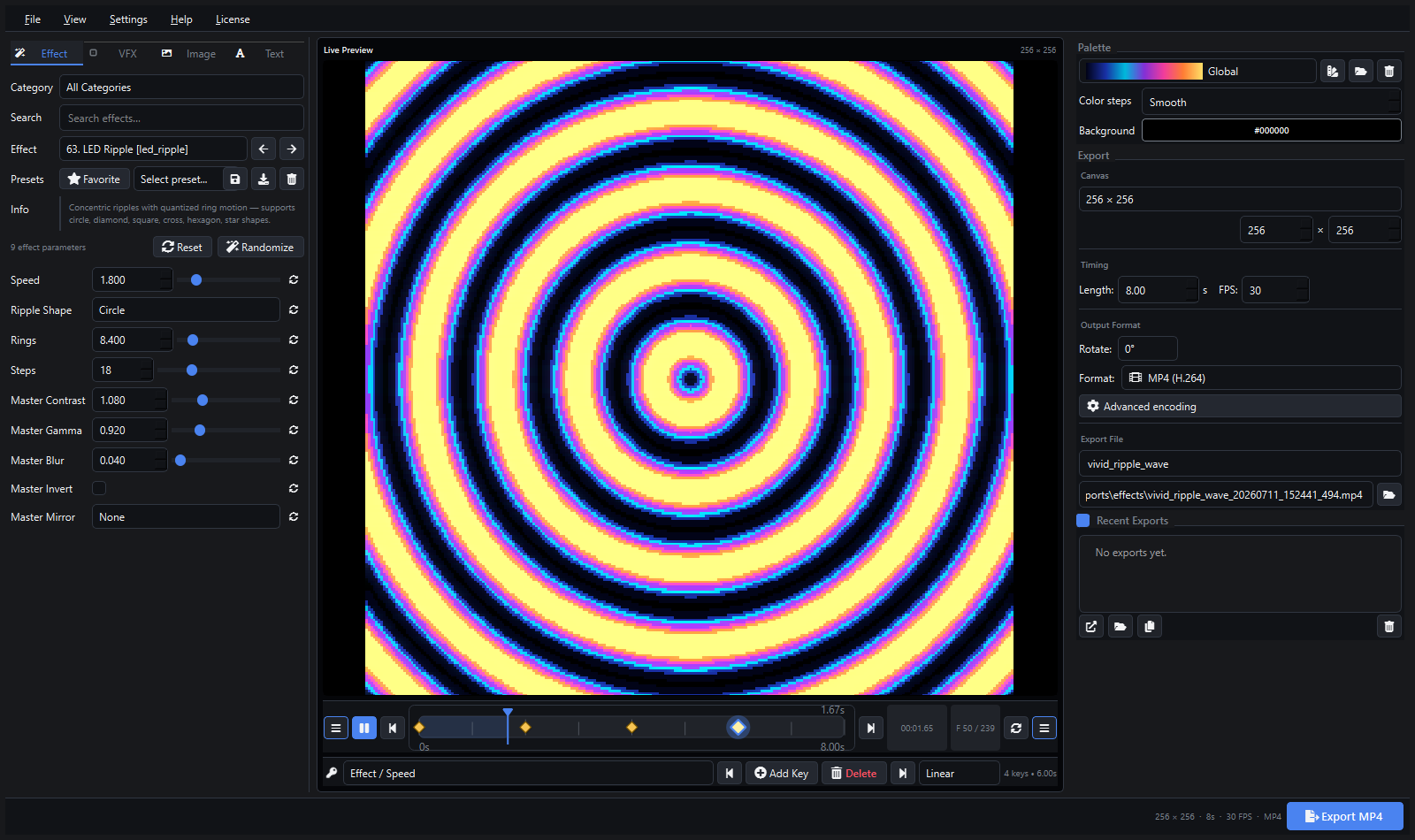
Version 1.2.0 is now available. This update brings major additions across every part of the application: new professional video codec support, GPU-accelerated effects, a full VFX system with keyframe animation, image and text overlay finishing tools, and a comprehensive interface redesign built around an RGB zone-colored accent system.
Buy Pixel LED Animator 3 on Gumroad
22 Professional Export Profiles
Version 1.2.0 expands the export system from basic video formats to a full professional codec lineup. Every profile exposes quality, pixel format, and encoder speed controls where applicable.
H.264 and HEVC
- MP4 (H.264) —
libx264, the universal standard. CRF quality (Auto/Lossless/High/Medium/Low/Very Low), yuv420p/yuv422p/yuv444p/rgb24 pixel formats, ultrafast-to-veryslow encoder presets - MP4 (H.265/HEVC) —
libx265, better compression at the same quality level. Same CRF, pixel format, and preset controls - MP4 (H.264 Lossless) — CRF 0, suitable for archival and further compositing
Professional Intermediate Codecs
- MOV (ProRes) —
prores_ks, the broadcast and post-production standard - MOV (DNxHD) — three bitrate variants: DNxHD 36 (8-bit), DNxHD 120 (8-bit), DNxHD 185 (10-bit). Compatible with Avid, DaVinci Resolve, and broadcast workflows
- MOV (HAP) —
hapcodec, GPU-decoded format for real-time playback in Resolume, MADRIX, and other VJ/live-performance software - MOV (HAP Alpha) — HAP with alpha channel for overlay and compositing use
- MOV (HAP Q) — higher-quality HAP variant
- AVI (DXV) —
dxvcodec, optimized for Resolume DXV playback - OpenEXR —
exrin MOV container, 16-bit float frames for HDR and VFX pipelines
Lossless and Archival
- AVI (FFV1 Lossless) —
ffv1in AVI, mathematically lossless, open standard - AVI (HuffYUV Lossless) —
huffyuv, fast lossless compression - MKV (FFV1 Lossless) —
ffv1in Matroska container
Web Delivery
- WebM (VP9) —
libvpx-vp9, open and web-optimized
LED-Specific Formats
- XDAT (LEDEdit) — proprietary binary format for LEDEdit workflows with frame-accurate pixel data
- FSEQ (Falcon Player / xLights) — compressed sequence format compatible with Falcon Player (FPP) and xLights, with optional Zstd compression
GIF
- Animated GIF with dither control (None, Floyd-Steinberg, Bayer 2×2, Bayer 4×4, Bayer 8×8), palette size 16–256, loop control, and presets (Small/Balanced/High Quality)
Image Sequences
- PNG, TIFF, OpenEXR, BMP sequences for use in any pixel-mapping or compositing pipeline
Additional Export Controls
- Canvas presets: 128×128, 256×256, 512×512, 192×192, 400×400, 800×800, 128×512, 512×128 plus fully custom dimensions (1–7680 × 1–4320)
- Duration 0.1–600s, FPS 1–240
- Rotation: 0°, 90°, 180°, 270°
- Seamless loop toggle for GIF and image sequence exports
149 Effect Generators
The effect library continues to grow. Version 1.2.0 introduces 12 GPU-accelerated effects alongside the existing generator collection.
GPU Effects (WebGPU)
GpuGradient, GpuPlasma, GpuMandelbrot, GpuJuliaSet, GpuWaterRipple, GpuFractalTree, GpuFire, GpuNeonVortex, GpuReactionDiffusion, GpuKaleidoscope, GpuStarfield, GpuBubble
These run on supported graphics hardware for real-time performance on mathematically intensive generators.
CPU Effects (137)
The CPU library covers: LED chasers, scanners, segmented comets, blocks, waves, port patterns, sine waves, diagonal sweeps, radial pulses, checker drift, spiral bands, radar sweeps, Lissajous fields, twinkle cells, plasma flow, tunnel rings, metaballs, hex cells, vortex flow, kaleidoscope, fire, aurora, snow, starfield, Game of Life, reaction-diffusion, boids, Voronoi, Mandelbrot, RippleWave, AI Snake, DNA helix, pixel noise, orbit dance, strobe burst, scanner fade, and many more.
Most effects include shape selectors (circle, square, diamond, cross, hexagon, star) and adjustable parameters such as speed, density, scale, complexity, ring count, direction, and animation steps.
VFX System with Keyframe Support
Five finishing effects can be layered over any animation. All VFX values support keyframe animation:
- Bloom — threshold and intensity controls. A bright-pass filter with gaussian blur produces the characteristic glow
- Sparkles — density, speed, size, and color. Pixel-accurate sparkle overlay using hash-based sampling
- Scanlines — thickness and opacity. Alternating row darkening for a retro CRT or display effect
- Vignette — corner darkening with adjustable strength
- Tiling — tile count, mirror toggle. Bilinear-sampled multi-tile display for pattern multiplication
Each VFX supports layer selection (Above Effect or Below Effect) and can be toggled independently.
Image Overlay with FX
The image overlay tool now includes a full effects suite. Any PNG, JPEG, or other PIL-compatible image can be placed over or under the generated animation with the following capabilities:
- Position modes: Center, Fill, Fit (Cover/Contain), Stretch
- Blend modes: Normal, Lighten, Add, Multiply, Screen, Overlay, Soft Light, Difference
- Opacity: 0–100%
- Animation: Pan, Zoom In/Out, Bounce, Float, Pulse, Rotate, and directional slides
- Image FX (all keyframe-able):
- Glow — radius, intensity, color
- Shadow — distance, blur, opacity
- Edge — width, color
- Sparkles — density, speed, size, color
- Pulse — amount
- Pixelate — 0–48px block size
- Masking: blend modes with configurable threshold and feather
Text Overlay with Gradient and Glow
The text overlay has been extended with gradient fills and synthetic italic support:
- Gradient fill: horizontal or vertical, sourced from the active colormap palette, with animated (Scroll, Cycle, Pulse) modes
- Solid fill: retains the standard color picker
- Outline: toggle, color, width (1–10px)
- Glow: toggle, radius, intensity
- Position: X/Y offset, alignment (Left/Center/Right), layer (Above/Below Effect)
- Animation: Scroll Left/Right/Up/Down, Slide In, Fade In/Out, Typewriter, Bounce
- Synthetic italic: when a true italic font variant is unavailable, the engine applies a shear transform
Font discovery uses a fallback chain: system font list, matplotlib, and manual search paths.
Keyframe Engine
The keyframe system supports five easing modes: Linear, Ease In, Ease Out, Ease In/Out, and Hold.
Keyframes can be added to:
- All effect parameters (defined per generator)
- Palette: color map selection, color steps, background color
- All VFX parameters (bloom threshold, sparkle density, scanline thickness, etc.)
- All image overlay parameters (opacity, position, FX values)
- All text overlay parameters (opacity, position, glow radius, etc.)
Numeric values and RGB colors interpolate between keys. Choice, toggle, and text-type parameters hold until the next key. Keyframes snap to the selected frame rate and can be stored in presets.
Recent Exports List
A new collapsible panel tracks up to 50 recent exports with file path, effect name, timestamp, dimensions, frame rate, duration, and profile. Each entry supports Open file, Open folder, Copy path, and Clear all actions. Missing exports are visually indicated.
RGB Accent Interface and Dark Theme Overhaul
The entire interface has been revised with a zone-based color system that makes the workspace easier to navigate and more visually intentional.
Zone Colors
| Zone | Accent | Elements |
|---|---|---|
| Preview (center) | Cyan #00d4ff | Focused borders, tabs, progress, sliders, primary buttons |
| Effects (left) | Magenta #ff2d95 | Sidebar border, palette panel, effect categories |
| Timeline (bottom) | Amber #ffb300 | Playhead, keyframe diamonds, transport bar |
| Export (right) | Green #2f9e44 | Export panel, bottom status bar, success states |
Refined Dark Palette
- Window background
#1a1a1e(blue-black), panels#212126, cards#28282c - Highlight
#0099ff(richer cyan-blue)
Colored Glow Shadows
Card surfaces receive zone-matched colored shadows (Cyan/Magenta/Amber/Green at low opacity) instead of flat black dropshadows, creating dimensional depth that matches each panel’s role.
Interactive Elements
Input fields, sliders, progress bars, tabs, and primary buttons all use cyan for hover and focus states. Section labels render in cyan for faster visual scanning. Button pressed states are visually distinct from hover states.
Playhead and Keyframes
The timeline playhead changed from red (#f75c6a) to amber (#ffb300). Keyframe diamonds use gold (#f5c842) with amber halos.
Additional Polish
- Thinner scrollbars with warmer handle colors
- VS Code-style tab underline accent
- Toast notification borders match zone colors
- Dialog buttons and icon sizes standardized
- All control heights unified at 28px
- Panel margins and spacing standardized
How to Update
Pixel LED Animator 3 v1.2.0 is available now for all licensed users. Download the latest installer from the purchase link. Your existing license key continues to work.
Buy Pixel LED Animator 3 | Explore the homepage | Contact support